

SAP Build Course: Your Next SAP App Could Be Built Without Traditional Coding
Imagine a business employee has a simple problem.
Every morning, the team downloads information from an SAP system, copies it into a spreadsheet, checks a few conditions manually, sends an email to a manager and waits for approval.
Nobody thinks the process is good.
But everyone has accepted it.
Then someone asks a simple question:
"Why don't we just build an app for this?"
Traditionally, that question could start a long journey. A requirement would be documented, sent to IT, discussed with developers, reviewed by architects, developed, tested, modified and eventually deployed.
The business problem may take minutes to explain, but turning the idea into a working application can take considerably longer.
This is one reason the low-code movement has become so interesting in enterprise technology.
SAP Build approaches application development differently. Instead of making every solution begin with a blank code editor, SAP provides visual and low-code capabilities for building applications, automating processes and creating business sites. SAP's current SAP Build portfolio also includes pro-code and AI-powered development capabilities, meaning the platform is not simply about replacing traditional development. It is about giving different types of users different ways to build.
And that leads to a more interesting question than "What is SAP Build?"
What could your business build if the distance between an idea and an application became much smaller?
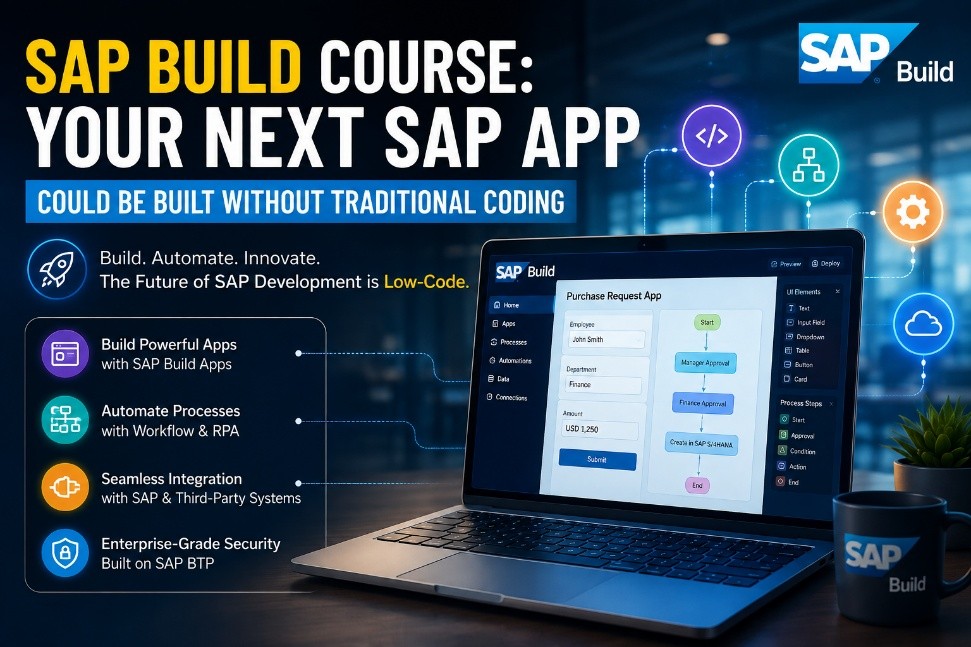
Definition: What Is SAP Build?
SAP Build is a suite of SAP capabilities for creating and extending business applications, automating processes, designing business sites and supporting different development approaches, from low-code/no-code to pro-code and AI-assisted development. SAP Build includes capabilities such as SAP Build Apps, SAP Build Process Automation, SAP Build Code and SAP Build Work Zone.
Why Is Traditional SAP Application Development Changing?
For years, enterprise application development followed a familiar pattern.
The business identified a problem. Functional teams documented the requirement. Developers translated it into technical specifications. Testing followed. Then came deployment and support.
There is nothing inherently wrong with this model. In fact, complex enterprise applications still require professional developers, architects and rigorous engineering.
The problem appears when every small business requirement follows the same heavyweight path.
A department might need a simple approval application. Another team may need a small internal request form. A business unit may want a focused mobile application for a specific task.
Not every requirement needs to become a massive custom-development project.
This is where low-code changes the conversation.
Instead of asking whether business users can replace professional developers, the better question is:
How can business experts and technical teams work closer together to deliver the right solution faster?
SAP describes Build as an ecosystem designed to support everyone from citizen developers and business experts to professional developers, with low-code and pro-code approaches available across the portfolio.
That is an important distinction.
The future is not necessarily developers versus low-code.
It can be developers plus low-code plus business expertise.
What Does "Without Traditional Coding" Really Mean?
The phrase "without traditional coding" sounds exciting, but it needs context.
It does not mean that software development has suddenly become unnecessary.
It means that certain applications can be created using visual interfaces, reusable components, configuration and low-code/no-code techniques rather than requiring developers to manually write every part of the application.
SAP Build Apps, for example, provides visual development capabilities for creating enterprise applications, while SAP Build Process Automation provides visual tools for workflows and automation.
Think about building a house.
Traditional development can be compared with creating many components from raw materials.
Low-code is more like working with well-designed building blocks.
You still need to know what you are building. You still need planning. You still need to understand structure, security and quality.
But you may not need to create every component from scratch.
That is why low-code does not mean low-skill.
A professional who understands business processes, data, integrations and security can often create much better low-code solutions than someone who simply knows how to drag and drop components.
What Can You Actually Build With SAP Build?
This is where SAP Build becomes more interesting.
Suppose an organization wants a simple employee equipment-request application.
An employee opens the application, selects the equipment required and submits the request. The request goes to the appropriate manager. The manager approves or rejects it. The employee receives an update.
On the surface, this looks like a small application.
But behind that simple experience are several things: a user interface, business rules, workflow, approvals, data and notifications.
SAP Build can bring different capabilities together to address these kinds of scenarios. SAP's learning material demonstrates SAP Build Apps for application development, SAP Build Process Automation for automated workflows and SAP Build Work Zone for business-facing experiences.
The same thinking can apply to procurement requests, service requests, employee processes, departmental applications and other focused business scenarios.
The important part is not building an app merely because you can.
The real value comes from solving a process problem with the right-sized application.
What Is SAP Build Apps?
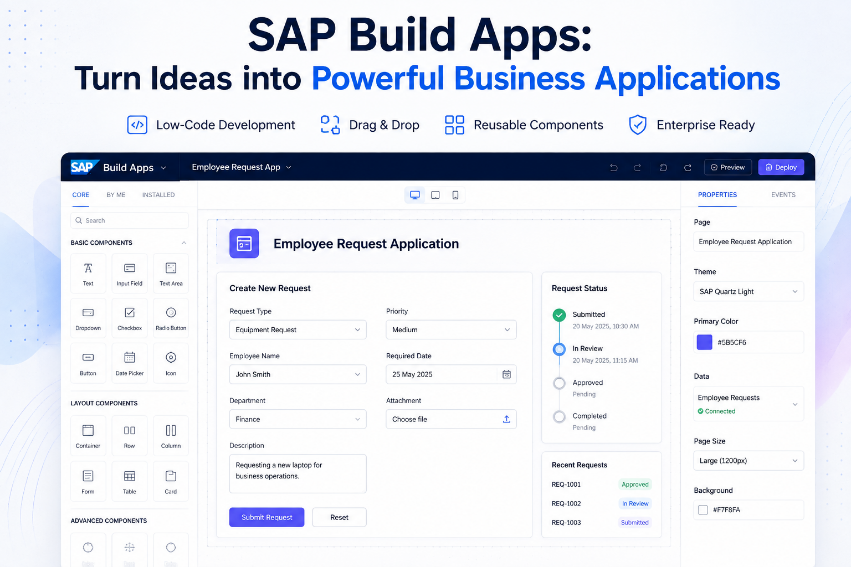
SAP Build Apps is the application-development part of the story.
SAP describes it as a visual development solution for creating enterprise applications without writing traditional code. Its learning content also covers creating application front ends and back ends, including databases for applications.
That opens the door to a different development experience.
Instead of beginning with thousands of lines of source code, a user can work visually with application components, logic and data.
For a business team, this can make application ideas easier to communicate.
For a technical team, it can reduce development effort in suitable scenarios.
And for an SAP professional, it creates another skill between functional understanding and traditional programming.
But there is an important boundary.
A visual development environment does not automatically make every enterprise application simple.
Highly complex logic, specialized integrations, unusual performance requirements and sophisticated architectures may still require professional development.
The smarter approach is not to ask whether SAP Build Apps can replace traditional development.
It is to ask:
Which applications are good candidates for visual development, and which ones deserve a pro-code approach?
What Is SAP Build Process Automation?
An application can make a task easier, but sometimes the bigger problem is the process around that task.
Imagine an employee submits a request.
The application collects the information, but someone still has to check it, send it to a manager, apply a business rule, update another system and notify the employee.
That is where process automation enters the picture.
SAP Build Process Automation supports the creation, execution and monitoring of business processes using low-code/no-code capabilities. SAP documentation describes capabilities for workflows, decisions, forms and automating repetitive tasks.
This creates an important relationship:
The app captures the request.
The workflow moves the request.
The business rules determine what happens next.
That is much closer to solving a complete business problem than simply creating another screen.
What Is SAP Build Work Zone?
Now imagine the organization has dozens of applications.
Employees don't want to remember where every application lives. They want an easy place to access the information, applications and tasks relevant to their work.
This is where SAP Build Work Zone fits.
SAP describes Work Zone as a way to centralize access to business applications, processes, information and communication through a unified experience. It can bring together SAP, third-party and custom applications.
So the story becomes bigger than application development.
You can think about it as:
Build the application → automate the process → provide a unified business experience.
That is why SAP Build should not be viewed as simply one low-code application builder.
It is an ecosystem of capabilities addressing different parts of the enterprise experience.
How Do SAP Build Apps, Process Automation and Work Zone Fit Together?
Consider a simple employee service request.
The employee needs an application where the request can be submitted.
SAP Build Apps can provide that application experience.
The request then needs to move through approval and business logic.
SAP Build Process Automation can handle that process.
Finally, employees and managers need a convenient way to access the application and their tasks.
SAP Build Work Zone can provide that unified business-facing experience.
SAP's learning content includes end-to-end scenarios where SAP Build Apps can trigger processes created with SAP Build Process Automation and where the resulting applications and processes can be integrated into SAP Build Work Zone.
This is where SAP Build becomes more powerful than the phrase "low-code app builder" suggests.
The real opportunity is connecting application + process + user experience.
Where Does SAP BTP Fit Into SAP Build?
If you are already familiar with SAP Business Technology Platform, this relationship becomes easier to understand.
SAP Build is part of the broader SAP technology ecosystem and works with SAP BTP services.
That matters because an enterprise application rarely exists by itself.
It needs identity and access management. It may need integrations. It may need data. It may need APIs. It may need monitoring and governance.
A business application that looks excellent but cannot securely interact with enterprise systems is not a complete enterprise solution.
SAP's documentation positions SAP Build services within the BTP environment and highlights integration with SAP and non-SAP applications.
This is why learning SAP Build in isolation is less valuable than understanding how it fits into the broader SAP architecture.
The more useful mental model is:
Business Requirement → SAP Build → SAP BTP Services → Enterprise Data and Systems
Can SAP Build Connect Applications With Business Data?
A business app becomes useful when it can work with real business information.
Imagine creating a procurement request application that cannot access the relevant procurement data.
The application may look modern, but employees would still have to switch systems to complete their work.
Integration changes that.
SAP Build Apps can work with back-end data and SAP Build capabilities can connect applications and processes through appropriate services and configurations. SAP's learning materials specifically cover advanced applications consuming SAP data and integrating process automations.
This is also where SAP professionals need to think beyond visual development.
They need to understand what data the application should access, how that access should happen, what permissions are required and what the user is actually allowed to see or change.
The easier it becomes to create an application, the more important good architecture becomes.
Is SAP Build Better Than Traditional Development?
There is no universal answer.
Traditional development remains extremely important for complex applications, advanced business logic, specialized requirements and scenarios where full programming flexibility is necessary.
SAP Build can be attractive when organizations want to develop suitable applications and automations using visual, low-code or no-code approaches.
The difference is therefore less about which technology wins and more about which approach fits the problem.
A simple departmental request application may be an excellent candidate for low-code.
A highly complex enterprise platform with sophisticated custom logic may require professional development.
The strongest SAP teams will understand both worlds.
They know when to configure.
They know when to build.
They know when to automate.
And they know when a problem requires traditional development.
That decision-making ability is more valuable than simply knowing how to use a tool.
What Are the Limitations of SAP Build?
Every technology has boundaries, and pretending otherwise makes an article less useful.
SAP Build does not mean every enterprise application can suddenly be created without developers.
Complex integrations may require deeper technical knowledge. Sophisticated application logic may require professional development. Security and governance cannot simply be dragged into place. Enterprise applications also need lifecycle management, testing, monitoring and proper authorization.
SAP itself supports both low-code and pro-code approaches across SAP Build, reflecting the fact that different application requirements need different development methods. SAP Build Code, for example, is positioned as an AI-powered development environment for professional developers working with technologies such as CAP, SAPUI5, JavaScript and TypeScript.
This is actually a strength.
A serious enterprise platform should not force every problem into one development model.
The smarter question is:
What is the simplest approach that can solve this problem securely, maintainably and at enterprise scale?
Can SAP Build Help Businesses Develop Solutions Faster?
Speed is one of the biggest reasons organizations are interested in low-code.
But speed should not mean skipping architecture or security.
It means reducing unnecessary development effort where the platform already provides reusable capabilities.
Consider a business team that needs a prototype.
With traditional development, the first version may require significant effort before users can experience it.
With a visual development approach, teams can often create an early version, test the idea and gather feedback sooner.
That changes the conversation.
Instead of spending weeks discussing what an application might look like, the team can potentially show stakeholders a working concept earlier.
SAP currently positions Build around reducing development effort through a combination of visual tools, traditional coding and AI assistance.
The important word is combination.
The future of enterprise development is unlikely to be one technology replacing everything else.
It is more likely to be different development approaches working together.
A Real-World Scenario: From Spreadsheet Problem to SAP App
Consider a procurement department that tracks supplier exceptions in a spreadsheet.
Every exception is manually entered.
Someone checks the spreadsheet.
An email is sent to the responsible manager.
The manager responds.
The spreadsheet is updated.
Then another employee checks whether the issue has been resolved.
The organization has created a process, but the process is living inside a spreadsheet and a collection of emails.
Now imagine approaching the problem differently.
First, understand what information is actually required.
Then create a focused application for entering the exception.
Next, create a workflow that sends the request to the right person.
Add business rules for common scenarios.
Connect the solution to relevant enterprise data.
Finally, provide users with an accessible business experience.
The transformation isn't really about replacing a spreadsheet with a prettier screen.
It is about turning an informal manual process into a structured digital workflow.
That distinction is what makes SAP Build interesting.
The technology is not the goal.
The business problem is the goal.
Why Should SAP Professionals Learn SAP Build?
SAP professionals are increasingly working in environments where business transformation, application development, automation and cloud technologies overlap.
A functional consultant may understand a business process extremely well but have limited application-development experience.
A developer may understand technology deeply but not fully understand the business process.
A business analyst may understand the requirement but depend heavily on IT to turn it into a solution.
SAP Build creates an opportunity to bring these perspectives closer together.
Professionals who understand SAP processes and can also work with modern application-development and automation tools can become more valuable contributors to transformation projects.
This is also where SAP Build Training can complement SAP Build learning. Signavio focuses heavily on understanding and transforming business processes, while SAP Build can help turn suitable process requirements into applications and automations. Together, these skills create a stronger connection between process discovery and solution creation.
The important career shift is from simply asking:
"How do I configure this?"
to also asking:
"How should this process work, and what is the best technology to improve it?"
What Should You Learn in an SAP Build Course?
A useful SAP Build Course should go beyond explaining where buttons are located.
The first priority should be understanding the SAP Build ecosystem and knowing what each capability is designed to solve.
From there, learners should gain practical exposure to application development with SAP Build Apps, process automation and business-site design with SAP Build Work Zone. SAP's own introductory course covers these areas, including no-code application development, visual programming, workflow automation and business-site design.
The next step should be integration.
A learner should understand how an application communicates with business data and how applications can interact with processes.
Security should also be part of the learning journey.
Knowing how to create an application is only half the skill. Knowing who should access it, what they should be allowed to do and how enterprise governance affects the solution is equally important.
Finally, hands-on projects matter.
A learner should not finish a course having only watched demonstrations.
They should be able to explain a business problem, design a solution, build it, test it and explain why that solution makes sense.
That is the difference between learning a platform and learning how to solve problems with a platform.
Is SAP Build Certification More Important Than Hands-On Experience?
Certification can demonstrate structured learning, but practical ability is what makes the skill useful in real projects.
Imagine two candidates.
One says:
"I completed SAP Build training."
The other says:
"I created an employee request application, connected it to a workflow, configured the approval process and published the experience for users."
The second explanation gives an employer something tangible to evaluate.
That does not make certification unimportant.
A strong combination is:
Structured learning + certification where relevant + hands-on projects + business understanding.
SAP's learning ecosystem itself includes practical learning journeys covering application development, automation, SAP data consumption, Work Zone access and end-to-end SAP Build scenarios.
For someone building a career in modern SAP development, that practical combination is much more valuable than memorizing terminology.
What Does the Future of SAP Build Look Like?
The interesting part of SAP Build is that low-code is no longer the entire story.
SAP's current Build portfolio brings together low-code, pro-code and AI-assisted development, and SAP's learning resources now also highlight AI agents and AI-supported application development.
That points toward a future where a professional might describe a business requirement in natural language, use AI to accelerate part of the development, use low-code tools for application composition, connect the solution to SAP data and then use professional development techniques where greater control is needed.
But there is one thing AI and low-code cannot eliminate:
Good judgment.
Someone still needs to decide whether the process makes sense.
Someone needs to understand the data.
Someone needs to think about security.
Someone needs to understand authorization.