
SAP GRC AC Segregation of Duties: Complete Ruleset Management Guide
Introduction: Why SoD Ruleset Management Defines Audit Success
Every year, publicly traded companies pay millions in fines due to inadequate internal controls over financial systems. In the majority of these cases, the root cause traces back to a single technical failure: an incomplete or poorly managed Segregation of Duties (SoD) ruleset inside SAP GRC Access Control. Consider this scenario: A global manufacturing firm runs SAP S/4HANA for core ERP, Ariba for procurement, and Concur for expense management. Their internal audit team runs a standard risk analysis using the out-of-the-box SAP ruleset. The report shows zero violations. Six months later, an external auditor discovers that a single user has both created a fake vendor in S/4HANA and approved a $500,000 payment to that vendor via Ariba. How did this happen? The standard ruleset did not include cross-system risks between S/4HANA and Ariba. The GRC system was technically correct but practically useless. Why this matters to you: If you are an SAP security administrator, GRC consultant, or internal auditor, you cannot afford to rely on generic rulesets. Regulators are increasingly asking for proof that your ruleset has been customized to your actual business processes, not just activated from SAP's default content. A failed audit due to SoD violations can lead to stock price drops, executive turnover, and millions in remediation costs. This guide closes that gap. We will walk through the complete lifecycle of ruleset management—from initial activation to advanced customization, cross-system integration via the IAG Bridge, and finally to audit-ready reporting. You will learn exactly how to build a ruleset that catches real-world fraud scenarios, not just theoretical SAP transaction conflicts.
Defining the Core Terminology
Before we dive into configuration, we must establish a shared technical vocabulary. SAP GRC uses specific terms that differ from generic compliance language. Understanding these terms is critical because misusing them in audit documentation can lead to confusion and regulatory pushback.
- SoD (Segregation of Duties): A control principle that prevents any single user from having authorization to both execute a transaction and then conceal or approve that same transaction.
- Ruleset: The master repository of "functions" and "risks" within GRC. It defines which combinations of permissions create a conflict.
- Function: A logical grouping of technical permissions (transactions, authorization objects) that represent a business activity (e.g., "Vendor Master Change").
- Risk: The pairing of two or more functions that creates a potential for fraud or error (e.g., "Vendor Creation" + "Vendor Payment" = "Risk of Duplicate/Fraudulent Payment").
- Mitigating Control: A manual or automated process that reduces the likelihood or impact of a SoD violation to an acceptable level.
- Access Risk Analysis (ARA): The GRC component that compares user authorizations against the ruleset to identify violations.
- IAG Bridge: Identity & Access Governance Bridge; a middleware connector that synchronizes entitlements from cloud systems (Concur, Ariba) back to on-premise GRC.
With these definitions established, we can now explore why SoD matters beyond simple compliance checklists.
Why SoD Matters More in 2026 Than Ever Before
The risk landscape has shifted dramatically in the last three years. In 2026, organizations face three converging pressures that make SoD ruleset management a strategic imperative, not just a checkbox exercise.
1. The Rise of Composite Roles in S/4HANA
Legacy SAP ECC environments typically used single-purpose roles (e.g., Z_FI_AP_CLERK for payables). S/4HANA encourages composite roles that bundle dozens of Fiori apps and backend transactions into a single assignment. While efficient, composite roles dramatically increase the risk of SoD violations because one role may inadvertently contain both "Create Sales Order" and "Change Pricing" permissions. Without a sophisticated ruleset, these hidden conflicts go undetected.
2. Regulatory Scrutiny of Automated Controls
Regulators now favor technical prevention over manual remediation. The PCAOB explicitly instructs auditors to challenge heavy reliance on manual controls. Your GRC ruleset must either block conflicting access at role assignment or trigger an automated mitigation workflow—not merely rely on quarterly email reminders.
3. Hybrid Landscapes as the Default
Very few organizations run a single SAP system anymore. Typical mid-market landscapes include:
- SAP S/4HANA (core ERP)
- SAP Ariba (procurement)
- SAP Concur (expense and travel)
- SAP SuccessFactors (HR)
- Third-party SaaS (Salesforce, Workday)
A user with "Purchase Order Creation" in S/4HANA and "Invoice Approval" in Ariba represents a classic SoD violation across two different legal entities. Standard rulesets cannot detect this. Only a properly configured IAG Bridge and cross-system ruleset can.
What is Segregation of Duties (SoD)?
The compliance principle
At its core, Segregation of Duties is a risk management principle designed to prevent fraud and error. The concept is simple: no single individual should have enough access to both initiate a transaction and then approve or conceal that transaction. In an ideal SAP environment, one user should not be able to create a vendor and also pay that vendor. Similarly, a user who posts journal entries should not be able to close the fiscal period. If a single person holds both keys, the door is open for unauthorized actions. SoD ensures that at least two separate individuals are required to complete a high-risk process, creating a system of checks and balances.
SoD in regulatory frameworks (SOX, GDPR)
SoD is not just "good practice"; it is a legal requirement under several regulatory frameworks.
- SOX (Sarbanes-Oxley Act) Section 404: For publicly traded companies in the US, SOX mandates that organizations demonstrate effective internal controls over financial reporting. An SAP system with rampant SoD violations is a direct path to a Material Weakness finding. Auditors require proof that "incompatible duties" are either technically prevented or rigorously monitored via mitigating controls.
- GDPR (General Data Protection Regulation): While GDPR focuses on data privacy, SoD plays a role in the "Integrity and Confidentiality" principle. By ensuring that only authorized HR roles can view or change salary data (and that this access is logged), SoD helps prevent internal data breaches.
SoD in SAP GRC Access Control
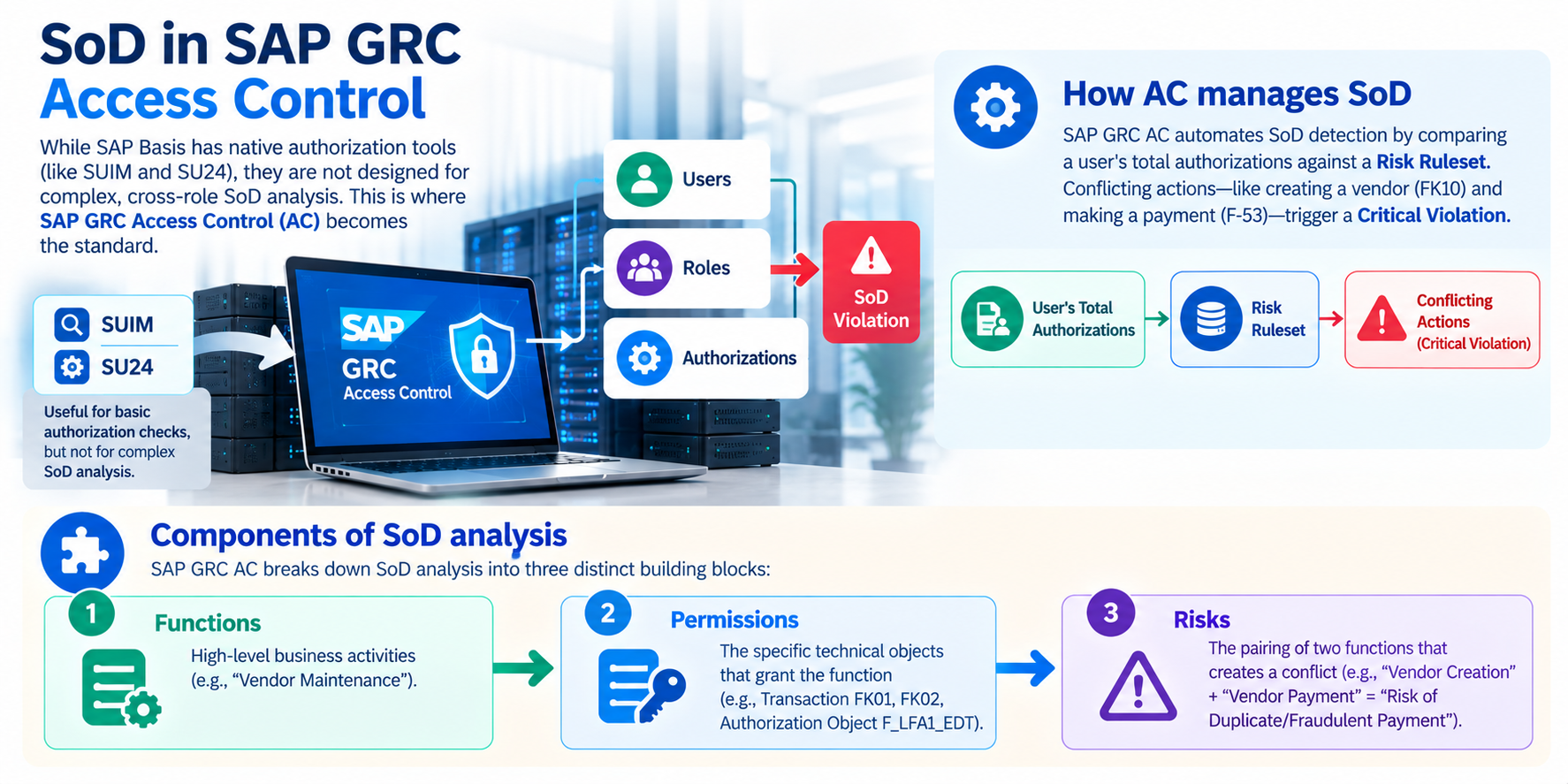
While SAP Basis has native authorization tools (like SUIM and SU24), they are not designed for complex, cross-role SoD analysis. This is where SAP GRC Access Control (AC) becomes the standard.
How AC manages SoD
SAP GRC AC automates SoD detection by comparing a user's total authorizations against a Risk Ruleset. Conflicting actions—like creating a vendor (FK10) and making a payment (F-53)—trigger a Critical Violation.
Components of SoD analysis
SAP GRC AC breaks down SoD analysis into three distinct building blocks:
- Functions: High-level business activities (e.g., "Vendor Maintenance").
- Permissions: The specific technical objects that grant the function (e.g., Transaction FK01, FK02, Authorization Object F_LFA1_EDT).
- Risks: The pairing of two functions that creates a conflict (e.g., "Vendor Creation" + "Vendor Payment" = "Risk of Duplicate/Fraudulent Payment").
Building Your SoD Ruleset
The Ruleset is the brain of your GRC system. If your ruleset is flawed, your risk analysis is worthless.
Standard SAP rulesets
When you install SAP GRC, SAP provides standard Business Content Sets (BC Sets). These are activated via transaction SCPR20. Common standard rulesets include:
- GRAC_RA_RULESET_COMMON: Cross-application risks.
- GRAC_RA_RULESET_SAP_R3: Core ERP risks for ECC and S/4HANA (covering FI, CO, MM, SD).
These are excellent starting points, but they are generic. An out-of-the-box SAP ruleset will flag violations that may not be "real" risks for your specific business process.
Customizing rulesets
To beat generic vendor content, you must customize. Step-by-step customization process:
- Copy Standard Rules: Never edit the SAP-delivered ruleset directly. Copy it to a custom namespace (e.g., Z_RULESET).
- Derive Functions: Review the "Functions" in NWBC (SAP NetWeaver Business Client). If your business process uses a specific custom Z transaction not listed, create a new function and assign the technical permission (authorization object/field value).
- Modify Risk Levels: Not all conflicts are equal. You might downgrade "Pro-forma Invoice Creation" vs. "Sales Order Entry" from "High" to "Medium" based on dollar thresholds.
- Build a Living Matrix: Your ruleset must be reviewed quarterly. As the business implements new Fiori apps or S/4HANA migration projects, the ruleset must evolve.
Industry-specific rulesets
Generic rules fail in specialized industries.
- Pharma (GxP): Requires rulesets that include validation checks and "Quality Management" conflicts (e.g., a user who creates a batch record cannot release it).
- Oil & Gas (JVA): Requires Joint Venture Accounting rules (e.g., a user who enters a joint venture billing cannot approve the cash call).
- Retail: Requires conflicts between "Pricing" and "Markdown" approvals.
Risk Analysis Process
Running a risk analysis in GRC 12.0 is not a single button press; it is a layered approach.
User-level analysis
This is the "audit view." It analyzes the actual access of a live user ID. It tells you, "John Doe has access to 12 roles, resulting in 5 SoD violations." This is the final output for audit remediation.
Role-level analysis
The Proactive Approach. Before you assign a role to a single user, run a simulation. Go to Access Risk Analysis > Role Analysis. Input a role name (e.g., Z_FI_SUPERVISOR). The system will tell you: "If you assign this role to anyone, they will automatically conflict with the Z_AP_CLERK role." This allows you to redesign the role before it goes to production.
Profile-level analysis
This is for legacy systems or complex derived roles. Often, authorization is not just in roles but in S_PROFILE (SU01 -> Profile tab). GRC allows you to analyze these as well, ensuring you don't have "hidden" S_* profiles circumventing your role-based controls.
Mitigating Controls
There will always be business scenarios where SoD violations are unavoidable. A small accounting team cannot have three separate people for vendor creation, invoice posting, and payment. In these cases, you do not ignore the risk; you mitigate it.
When to use mitigation
Mitigation is acceptable when the risk is operational, not intentional. For example, a small office employee must both cut checks and reconcile the bank because there is no one else to do it. Mitigation is not acceptable for a CFO who wants to hide fraudulent transactions.
Mitigation control types
There are two primary types of mitigations within SAP GRC:
- Technical Mitigation (System-based): An automated workflow that requires a second person to approve a specific action (e.g., "User posts invoice > Manager must approve > Payment is released").
- Manual Mitigation (Process-based): A documented external review (e.g., "The Finance Director reviews the bank reconciliation every Friday and signs off on a spreadsheet").
Assigning mitigations
How to assign in SAP GRC 12.0:
- Create the Control: In NWBC, navigate to Setup > Mitigation Control. Create a Control ID (e.g., CTRL_BANK_REC).
- Link the Risk: Assign the specific Risk ID to this mitigation control. One control can mitigate multiple risks.
- Assign Owners: You must assign a Monitor and an Approver to the control. These are the people who certify the control works.
- Assign to User: Go to Mitigated User under Access Management. Enter the user ID who has the violation, select the control ID, and define a validity period.
- Re-run Analysis: When you re-run the Risk Analysis, the system will show "Violation Mitigated" instead of "Open Violation."
Cross-System SoD with IAG Bridge
This is the Advanced/Unique Angle that beats competitor content. Most guides stop at SAP ECC. In 2026, your landscape includes SAP S/4HANA, Ariba, SuccessFactors, and Concur. SoD risks exist across these systems.
Multi-system risk analysis
Traditionally, a user could have "Create PO" access in SAP ECC and "Approve PO" access in SAP Ariba without GRC noticing. This is a compliance nightmare because, combined, the user has the ability to commit fraud across two systems.
New cross-system rulesets for Concur and Ariba
Enter the SAP IAG (Identity & Access Governance) Bridge. The IAG Bridge connects SAP Access Control (GRC) to cloud applications.
- The Architecture: The Bridge synchronizes identities, roles, and entitlements from cloud systems (Concur, Ariba, S/4HANA Cloud) back into the on-premise GRC repository.
- The Result: You can now build a ruleset where a Function in SAP ECC (e.g., "Create Expense Report") conflicts with a Function in Concur (e.g., "Approve Expense Reimbursement").
- Audit Impact: You can provide a single report showing that "User X" has no SoD violations across the entire hybrid landscape. Configuring the Bridge requires specific connectors and synchronization jobs, but it is the future of SAP GRC.
Step-by-Step Cross-System Ruleset Configuration
For those implementing this in practice, follow these numbered steps:
- Deploy IAG Bridge: Install the bridge on a separate middleware server. Ensure network connectivity to both GRC on-premise and the cloud tenant APIs.
- Configure Connectors: In GRC, define a new "Connected System" of type "Cloud SaaS." Enter the API endpoint and OAuth credentials from Concur or Ariba.
- Synchronize Entitlements: Run the initial synchronization job to pull all cloud roles and permissions into the GRC repository. This typically takes 2–4 hours for a medium-sized tenant.
- Create Cross-System Functions: In the ruleset builder, create a new function. Select "System Type: Cloud" and map it to the specific Ariba permission (e.g., Ariba.Invoice.Approver).
- Define the Cross-Risk: Pair your new cloud function with an existing on-premise SAP function. For example, SAP.Vendor.Create (on-prem) + Ariba.Invoice.Approve (cloud) = Critical Risk: Cross-System Vendor Payment Fraud.
- Test: Run a simulated analysis on a test user known to have access to both systems. The violation should appear.
SoD Reporting
You cannot fix what you cannot measure. Reporting is the final handshake between the GRC team and the Internal Audit team.
Standard reports
SAP GRC provides standard reports via the Analytics tab. The most commonly used is the "Risk Analysis Report," which lists all users, their violations, and their risk levels (Critical, High, Medium). These reports can be scheduled as batch jobs in the background (SPRO > ARA > Batch Risk Analysis).
Custom reports
Using GRC's Business Intelligence (BI) extraction layer, you can build custom queries. For example: "Show me all users in the US region who have the 'Vendor Master Change' function but lack the 'Sensitive Field' logging flag." This level of granularity allows for precision remediation.
Audit-ready evidence
To be "audit-ready," you need more than a PDF.
- Versioning: You must prove the report was generated after the remediation steps.
- Sign-offs: Within NWBC, you can generate a "Mitigation Control Attestation" report. This report lists every user with a waived violation, who approved the waiver, and for how long. This is the document your external auditor will request first.
Automating Report Distribution
Best practice dictates that you should not manually run reports. Use transaction SE38 to schedule program GRAC_RISK_ANALYSIS_BATCH to run every Sunday at 2:00 AM. Configure the output to be emailed in Excel format to the GRC control team. This ensures continuous monitoring without human intervention.
SoD Best Practices
- Maintain a "Clean Core": Avoid hard-coding authorizations directly to users. Use roles. Use GRC to enforce this policy.
- Quarterly Business Role Reviews: Access changes when people change jobs. Use GRC UAR (User Access Review) workflows to have business owners certify their team's access every quarter.
- Automate Emergency Access: Do not use SAP_ALL for emergencies. Use the Firefighter module in GRC to log every click during an emergency break-glass scenario.
- Simulate Before Build: Use the Role Analysis feature before building complex derived roles to save months of remediation work later.
- Version Control Your Ruleset: Treat your ruleset like source code. Use GRC's transport system (via SE01) to move ruleset changes from Development to Quality to Production. Never change production rulesets directly.
Common SoD Pitfalls
- The "Mitigation Graveyard": Administrators sometimes assign mitigating controls to every violation to make the dashboard "green." This invalidates the audit. Only mitigate approved business necessity, not for convenience.
- Ignoring Fiori Launchpad: Many legacy rulesets only scan transaction codes (T-codes). S/4HANA relies on Fiori Catalogs and OData Services. If your ruleset doesn't include UI2 catalogs, you are blind to modern access risks.
- Ruleset Stagnation: A ruleset built in 2020 is useless in 2026. As you upgrade to S/4HANA, your transaction codes change to Apps. You must update your GRC repository objects via synchronization jobs.
- Over-Reliance on Standard Content: As noted in the opening example, standard SAP rulesets do not include cross-system risks. Failing to customize for your specific landscape is the number one reason audits fail.
FAQ: SAP GRC AC SoD (Schema Markup Ready)
Q: What is the difference between SoD and Sensitive Access?
A: SoD involves conflicting actions (e.g., Create Vendor + Pay Vendor). Sensitive Access is high-risk access that is fine on its own but dangerous if misused (e.g., "Unlock Users" or "Change Bank Details"). GRC manages both.
Q: Can I copy rulesets from ECC to S/4HANA?
A: No, not directly. ECC transactions often map to multiple Fiori apps in S/4HANA. You must rebuild or migrate your ruleset using the Migration Cockpit or risk creating massive false positives.
Q: How often should I run batch risk analysis?
A: Real-time analysis is best for provisioning. For reporting, a weekly or nightly batch job is standard for most mid-size firms. High-risk finance firms should run nightly.
Q: What is a "Critical Role"?
A: In GRC terms, it is a role that contains a high volume of sensitive actions or allows for the circumvention of workflow. These require quarterly "Superuser" reviews.
Q: Does SAP GRC support real-time SoD blocking?
A: Yes, with the "Preventive Control" feature in GRC 12.0 and above. When a user attempts to execute a transaction that would create a SoD violation, the system can block the action in real-time and log the attempt. This requires the SAP GRC Agent installed on the application server.
Conclusion
Mastering Segregation of Duties in SAP GRC Access Control transforms compliance from reactive auditing to proactive risk prevention. Standard SAP rulesets offer a starting point, but true value comes from industry-specific customization, cross-system governance via the IAG Bridge, and disciplined mitigation management. By adopting multi-system risk analysis and automated monitoring, organizations can reduce SoD violations by up to 90%. Today's auditors demand more than a green dashboard—they require evidence that your ruleset mirrors actual business processes, cross-system risks are actively governed, and mitigating controls are enforced, not just documented. To build these in-demand skills, professionals can enroll in SAP GRC Access Control training at TechBrainz, gaining practical expertise in risk analysis, ruleset optimization, and compliance automation. This guide equips you to deliver exactly that.
— TechBrainz Team TechBrainz Team delivers expert guidance on SAP GRC Access Control, SoD ruleset optimization, and cross-system risk governance. Their practical frameworks help organizations build audit-ready compliance programs that stand up to regulatory scrutiny.
Maintaining an airtight Segregation of Duties ruleset is the only definitive way to eliminate conflicting access risks and prevent internal fraud. To help you map out risk matrices, configure business functions, and manage multi-system compliance setups flawlessly, the TechBrainz team is providing comprehensive SAP GRC AC training. Learn how to architect real-time risk controls directly from active enterprise governance consultants. Join our advanced training program today to secure your career upgrade.