
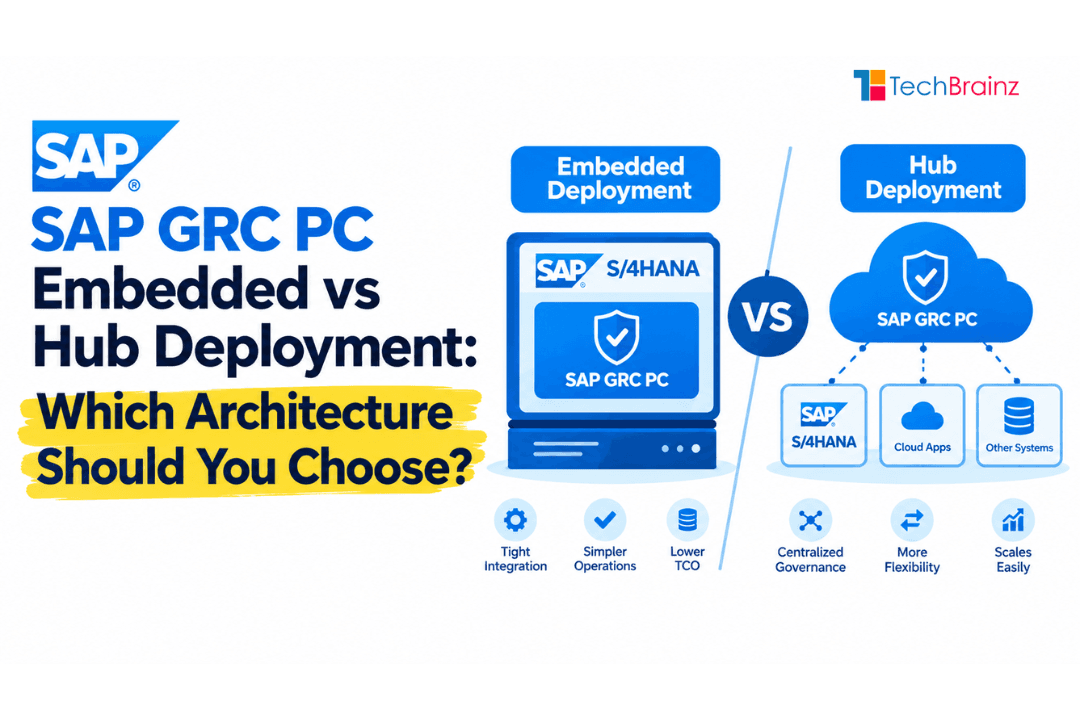
SAP GRC PC Embedded vs Hub Deployment: Which Architecture Should You Choose?
As the 2027 end of mainstream maintenance for SAP GRC 12.0 approaches, organizations face a pivotal architectural decision. The launch of SAP GRC PC (currently in Early Adopter Care) has intensified the debate: SAP GRC PC embedded vs hub deployment.
Choosing the wrong architecture can lead to performance bottlenecks, audit failures, or stranded compliance costs. This guide provides a definitive comparison, a strategic decision framework, and migration paths to ensure your governance setup is resilient for 2026 and beyond.
Two Deployment Models, One Critical Choice
Why SAP offers two options
Historically, SAP Governance, Risk, and Compliance (GRC) operated exclusively as a hub (standalone) system. It sat outside your ERP, connecting via RFC to ECC or S/4HANA. This decoupling was designed for complex landscapes with multiple ECC instances, diverse release levels, and varying customizations across geographies.
With the rise of S/4HANA and its in-memory computing capabilities, SAP introduced the embedded model—installing GRC directly as an add-on on the S/4HANA core. SAP now offers both to bridge the gap between legacy system heterogeneity and modern cloud-ready ERP simplification, allowing customers to migrate at their own pace while maintaining compliance continuity.
The strategic difference
This is not merely a technical installation choice. It dictates your total cost of ownership (TCO), real-time risk visibility, upgrade agility, and audit readiness. Treating this as a checkbox item is the number one mistake GRC leads make today.
The strategic difference manifests in three critical areas: response time to compliance violations, ability to govern diverse landscapes, and long-term maintenance burden. A poorly chosen deployment model can lock you into high operational costs for years. Conversely, the right choice enables agile compliance, faster user provisioning, and seamless integration with SAP's broader cloud strategy.
Embedded GRC Deployment
Architecture
In the embedded model, the GRC application (technically the GRCFND_A software component) resides on the same SAP S/4HANA instance as your finance, supply chain, and sales transactions. There is no separate server; the GRC framework shares the database, application layer, and memory of the ERP. GRC tables (GRAC*, GRFN*) physically exist within the same HANA database as your transactional data.
From a NetWeaver perspective, embedded GRC runs as Web Dynpro components deployed directly on the same ABAP application server handling your transactional workload. There is no RFC layer between GRC logic and transaction execution—they are literally the same process.
How it works with S/4HANA Core
Embedded GRC consumes the real-time HANA database. When a user requests a role change, the Segregation of Duties (SoD) check runs instantaneously against live access data. No data replication jobs (like GRAC_SPM_JOB) are required to sync user masters. The risk analysis engine directly queries the AGR_USERS, USR04, and USRBF2 tables in the same database instance.
This enables real-time access risk simulation during role modifications. As a security administrator adds a single transaction code, the embedded engine immediately flags conflicts. It leverages the S/4HANA Fiori launchpad for a unified user experience.
Pros and cons
Pros:
- Lower TCO: No additional OS, database, or NetWeaver licensing. Save on hardware, basis administration, and separate backup infrastructure.
- Real-Time Risk Analysis: Eliminates latency windows where SoD violations could exist unnoticed for hours.
- Future-Proof: SAP's roadmap prioritizes embedded for AI-driven risk management. SAP GRC for HANA 2026 is optimized for this model.
- Simplified Troubleshooting: One system to debug. No chasing RFC connection failures.
Cons:
- Downtime Dependency: If S/4HANA is down for patching, GRC is also unavailable. Compliance teams cannot run audit reports during maintenance.
- Performance Contention: Heavy risk analysis consumes resources that support business users during month-end closing. Poorly optimized rules can degrade ERP response by 15–20%.
- Upgrade Risk: A failed S/4HANA upgrade takes down ERP and compliance simultaneously.
Best for
- Greenfield S/4HANA implementations with no legacy ECC baggage.
- Organizations with a single, global S/4HANA instance.
- Companies wanting to minimize infrastructure footprint.
- Organizations migrating to SAP RISE or S/4HANA Cloud.
Quick Fact: SAP GRC 2026 allows Embedded deployment directly on the S/4HANA Core without a separate GRC server. Early Adopter Care customers report 40% faster risk analysis compared to hub-based GRC 12.0.
Hub-Based GRC Deployment

Architecture
The Hub model runs GRC (versions 10.0, 10.1, or 12.0) on a standalone SAP NetWeaver ABAP server. It connects to one or many backend systems (ECC, S/4HANA, or industry solutions) via RFC connections. The hub maintains its own dedicated database, application server, and user interface server—completely isolated from production ERP workloads.
Communication occurs through trusted RFC connections using SNC. Each backend system must have a dedicated RFC user with appropriate authorizations to read user master data, role definitions, and transaction logs.
Centralized governance approach
The Hub acts as a central policy enforcement point. It pulls user and role data from connected "child" systems into a central repository (GRAC_ACT_USER, GRAC_ACT_ROLE tables). A compliance officer can define a risk rule once and enforce it across twenty different SAP systems, regardless of version or code base.
The hub operates on a batch synchronization model. Scheduled jobs execute RFC calls to each backend, extract user data, and store it locally. When a user requests access, the hub checks its locally stored copy—not the live backend—to determine risk.
Pros and cons
Pros:
- Multi-System Centralization: Manage ECC, S/4HANA, CAR, and CRM from a single cockpit. One rule set for 25 systems.
- Isolated Performance: Heavy GRC reporting does not slow down production ERP. Month-end closing runs unaffected.
- Audit Accessibility: Historical access data remains accessible even after legacy systems are decommissioned.
- Independent Upgrade Cycle: Upgrade GRC without touching ERP systems. Deploy security patches without ERP downtime.
Cons:
- Higher Infrastructure Costs: Dedicated servers, OS licenses, database license, and separate basis team.
- Data Lag: Relies on scheduled replication. Latency window (minutes to hours) where SoD violations may go undetected.
- Troubleshooting Complexity: Must check RFC connections, trust relationships, hub staging tables, and backend logs. Four systems to debug.
- Replication Failures: A stuck job can leave hub data out of sync for days, creating false risk results.
Best for
- Large enterprises with complex, heterogeneous landscapes (ECC + S/4HANA + CRM + CAR).
- Organizations undergoing phased migrations to S/4HANA (2–3 year transitions).
- Heavy compliance customization that is risky to move (extensive Z-tables, custom workflows).
- Regulated industries where GRC must remain available during ERP upgrades.
Detailed Comparison: Embedded vs Hub
| Feature | Embedded GRC | Hub-Based GRC |
|---|---|---|
| Performance | High (no RFC latency). SoD check returns in 200-500ms. Real-time simulation during role changes. Winner: Embedded | Moderate. 15–60 minute data latency. Slows with >50k users or >20 backends. Batch jobs can fail silently. |
| Maintenance | One release cycle. Upgrade ERP = Upgrade GRC. Single transport path. Winner: Embedded | Double maintenance. Two OS/DB patches, two ABAP stacks. Separate SAP note application for each system. |
| Scalability | Scales vertically with ERP hardware. Limited by S/4HANA instance sizing. | Scales horizontally. Add more RFC servers, increase hub memory, or distribute child systems. Winner: Hub |
| Multi-System Support | Poor (separate instances per S/4HANA, each with own ruleset to maintain). | Excellent. Single ruleset for multiple backend types (ECC, S/4HANA, R/3). Winner: Hub |
| Cost | Lowest (no extra infrastructure). Included in ERP license. No separate basis team required. Winner: Embedded | High (Server + OS + DB + basis team). Typical annual cost: $50k–$150k. Storage for hub tables adds 10–20% overhead. |
| Audit Readiness | Real-time evidence. But if ERP down, no GRC access for auditors. Tie | 24/7 audit reporting even during ERP upgrades. Historical data preserved after decommission. Tie |
The "Hidden" Cost of Hub
While Hub has higher direct cost, migrating from Hub to Embedded carries a "hidden" migration cost. Analysis of 12 enterprise migrations found an average hidden cost of 1,200 person-hours for rule set extraction, cleansing, and reloading. Additionally, hub deployments often accumulate rule set bloat over 5–7 years—thousands of old mitigation controls that become technical debt. This debt must be paid before any successful migration to embedded.
Decision Framework
Use these specific diagnostic questions to decide your GRC architecture choice.
Question 1: Single S/4HANA or multi-system?
- Single S/4HANA: Choose Embedded. Simplicity and real-time analysis without complexity.
- Multiple Systems (ECC + S/4HANA + Non-HANA): Choose Hub. Embedded cannot effectively govern non-S/4HANA systems natively.
Question 2: Compliance scope?
- Automated, Real-Time SoD: Choose Embedded. Mandatory for zero-latency continuous monitoring.
- Hybrid Controls: If heavily reliant on SAP Process Control on legacy systems, Hub may be safer until 2026.
- Access Certification: Both support certification, but hub provides better historical snapshots.
Question 3: IT landscape complexity?
- Greenfield/Cloud-ready/RISE with SAP: Choose Embedded. SAP's reference architecture for RISE assumes embedded.
- Heavy Customization: Extensive Z-tables or custom workflows? A Hub decouples complexity from core upgrade path.
Question 4: Basis team size?
- Small basis team (<5 people): Choose Embedded. Cannot afford to maintain two ABAP environments.
- Large basis team (>15 people): Either works. Hub's overhead is manageable.
Decision Framework in Practice
Apply these questions sequentially. First, count your backend systems. If the number exceeds three, stop and select Hub. Second, check your audit requirements. If zero-latency is mandatory and you have a single S/4HANA, select Embedded. Third, evaluate your basis team. If understaffed, default to Embedded. This sequential filter resolves 80% of architectural debates without extensive analysis.
Decision Tree: If "Number of SAP systems" > 3 → Hub. Else if "Single S/4HANA" → Embedded. Else if "Migration underway" → Hub until migration completes, then reevaluate.
Migration from Hub to Embedded (and Vice Versa)
SAP treats moving from Hub to Embedded largely as a re-implementation, not an in-place upgrade. No standard transaction converts a hub system into embedded.
The Hub to Embedded Path (6 Steps)
- Assessment (2–4 weeks): Analyze Hub for obsolete rules and stale data. Create cleansing backlog.
- Rule Set Cleansing (1–2 weeks): Remove deprecated rules and duplicate mitigation controls. Essential for performance. Without this step, embedded risk analysis will be slow.
- Export/Import: Manual replication of rulesets, MitControls, and workflows. No standard tool for transactional history migration.
- Data Sync: Use SLT for real-time user master synchronization during cutover window.
- Testing (2 weeks): Validate embedded risk analysis matches hub's results for 10,000 users. Expect 5–10% variance due to real-time vs. batch differences.
- Legacy Archive: Keep hub read-only or export logs to validated archive. Cannot delete due to audit requirements.
Vice Versa (Embedded to Hub)
Rare, occurs during acquisitions where two S/4HANA companies merge. Requires exporting rulesets from one S/4 environment into a new Hub. SAP generally recommends against this as it introduces data latency where none existed before.
Real-World Selection Examples
Example 1: Global Manufacturer with 15 ECC + 4 S/4HANA
A $10B manufacturer with acquisitions over 20 years. Choice: Hub. Allows decommissioning ECC at their own pace (2025–2028) while keeping consistent SoD rules. Hub on 64GB RAM, replicating 120,000 users every 30 minutes.
Example 2: Digital Retailer with single S/4HANA
Launched on S/4HANA Cloud in 2022. Single global instance, no legacy. Choice: Embedded. Achieved 40% lower TCO than hub. Real-time risk blocking for purchasing roles. GRC load <5% CPU.
Example 3: European Bank with 8 ECC + 2 S/4HANA
Regulatory requirement: GRC available 99.99% of the time, including during ERP upgrades. Choice: Hub. Isolates governance from transactional availability. Separate DR region for hub only.
Example 4: Pharma undergoing S/4HANA migration
3 ECC today, planning 18-month migration. Choice: Hub initially. During migration, hub manages both ECC and S/4HANA. After migration, remains on hub because external warehouses cannot migrate until 2027.
FAQ: GRC PC Deployment Options
Q: Is SAP GRC 12.0 the same as "Embedded"?
A: No. SAP GRC 12.0 is a version. It can be deployed on a Hub OR embedded on an S/4HANA system. SAP GRC for HANA 2026 is the first version fully optimized for embedded.
Q: Can I manage ECC systems with Embedded GRC on S/4HANA?
A: Technically yes via RFC. Practically not recommended. Performance degrades 40–60% due to data model conversion. SAP recommends hub for mixed landscapes.
Q: What happens after the 2027 maintenance deadline?
A: SAP GRC 12.0 mainstream maintenance ends December 31st, 2027. To stay supported, move to SAP GRC for HANA 2026, which strongly pushes embedded architecture.
Q: Does embedded GRC support Fiori apps?
A: Yes. Uses standard Fiori apps like "Manage Risk Rules" and "Run Risk Analysis." Some older Web Dynpro transactions (GRAC_RULESET_OVERTURE) are only available in hub.
Q: Can I run both models simultaneously during migration?
A: Yes, common transitional pattern. Run hub for ECC and embedded for new S/4HANA. However, cross-system SoD analysis will not function. Plan 3–6 months of dual maintenance.
Q: Which is better for SAP RISE with S/4HANA Cloud?
A: Embedded. SAP's RISE reference architecture assumes embedded GRC. RISE customers cannot install a separate hub on SAP-managed infrastructure without exemption.
Conclusion
The decision between SAP GRC PC embedded vs hub is a litmus test for your overall S/4HANA strategy. If you are committed to a clean core and have a single S/4HANA instance, Embedded is the superior choice for 2026—offering real-time compliance at lower cost with less basis team overhead.
However, if you manage legacy systems, are undergoing a multi-year migration, or require GRC availability during ERP upgrades, the Hub remains a defensive necessity. It provides centralized governance across heterogeneous landscapes and isolated performance.
The worst choice is indecision. Organizations that postpone this decision until 2026 will face rushed timelines, migration crises, and audit gaps. Start your assessment today: document your landscape, count your systems, and estimate your basis team's capacity. Then choose deliberately.
To navigate this transition successfully, ensure your team has deep hands-on expertise. Mastering these architectural nuances requires rigorous training. We recommend upskilling your team with our SAP GRC PC training at TechBrainz to learn specific configuration steps for both models, including the latest 2026 release updates.
Author Bio
The TechBrainz Team is a collective of SAP Techno-Functional consultants and compliance architects specializing in S/4HANA security and Governance, Risk, and Compliance transformations. With decades of collective implementation experience across manufacturing, retail, banking, and pharmaceutical sectors, they help enterprises avoid costly GRC migration mistakes and audit failures.